openwebrxplus-plugins
This receiver plugin adds a new or replaces the default S-meter with a high-resolution, graphical bar display. It automatically switches between HF and VHF/UHF standards and offers extensive customization options via a built-in menu.
Preview
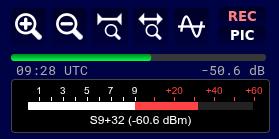
Load
Add this line in your init.js file:
// load remote
Plugins.load('https://0xaf.github.io/openwebrxplus-plugins/receiver/smeter/smeter.js');
// or local
Plugins.load('smeter');
Configuration
You can configure the plugin by setting the parameters in your init.js file (before loading the plugin):
// --- S-METER CONFIGURATION (init.js) ---
// These values must be set BEFORE Plugins.load('smeter')
window.smeter_config_global = {
    calibration_offset_hf: 0,  // Calibration for HF (<30MHz) in dB
    calibration_offset_vhf: 0, // Calibration for VHF/UHF (>30MHz) in dB
    linearity_hf: 1.0,         // Linearity correction factor for HF
    linearity_vhf: 1.0,        // Linearity correction factor for VHF
    s0_offset_hf: 0,           // S0 Level adjustment for HF
    s0_offset_vhf: 0,          // S0 Level adjustment for VHF
    hide_original: false,      // Set to true to hide the original S-meter
    show_text: true,           // Set to false to hide the text below the S-meter
    show_dbm: false,           // Show dBm value next to bar
    use_iaru_vhf: true,        // Set to true to use IARU VHF standard (S9 = -93dBm)
    smeter_delay: 500          // Delay in ms to sync with audio
};
Parameter Explanation
- calibration_offset_hf: Adds this value (in dB) to the measured shortwave signal. Useful for compensating for cable attenuation or gain.
- calibration_offset_vhf: Same for frequencies above 30 MHz.
- linearity_hf/vhf: Multiplier for the signal level (Slope). Use this if the S-meter values do not scale linearly (e.g. 10dB input change shows as 8dB). Default is 1.0.
- s0_offset_hf/vhf: Adjusts the S0 reference level (start of the scale). Useful if the noise floor is displayed too high.
- hide_original: If set to
true, the standard OpenWebRX S-meter is hidden, and only this plugin is displayed. - show_text: If set to
false, the text display (S-value and dBm) below the bar is hidden. - show_dbm: If set to
true, the current signal level in dBm is displayed numerically to the right of the S-meter bar. - use_iaru_vhf: If set to
true(default), the IARU standard for VHF (S9 = -93dBm) is used. Iffalse, the HF standard (S9 = -73dBm) is used for all frequencies. - smeter_delay: Adds a delay (in milliseconds) to the S-meter display to synchronize it with the audio (useful for web SDR latencies).
Usage
Long Press (> 800ms) on the S-Meter panel to open the Settings Menu.
On current OpenWebRX+, the menu opens in a movable, resizable plugin window. On older versions it remains a floating menu beside the meter. The meter itself stays in the receiver panel.
Settings Menu
- Calibration Offset (Blue): Global offset in dB. Adjusts the entire scale up or down (e.g. to compensate for cable loss).
- S0 / S9 / S9+60 Input Levels (Green): Defines which input level (dBm) corresponds to S0, S9, and S9+60 on the meter. This allows for precise 3-point calibration and linearity correction.
- Calculated Linearity: Displays the resulting linearity factor based on the S0/S9 settings.
- Auto S0 (Noise): Automatically calibrates the S0 level so that the current noise floor is displayed as S2.
- Auto S9 (Signal): Automatically calibrates the S9 level to the current signal strength by adjusting the linearity (slope), keeping S0 fixed.
- Show dBm: Toggles the numeric dBm display next to the bar.
- Hide Original: Toggles the visibility of the original OpenWebRX+ S-meter.
- IARU VHF Standard: Toggles between the IARU standard for VHF (S9 = -93dBm) and the HF standard (S9 = -73dBm). Default is enabled.
- Sync Delay: Adjusts the time delay of the S-meter to match the audio output.
- Export/Import: Save your settings to a JSON file or load them back.
- Copy Config: Generates a code snippet with your current settings to paste into
init.js. - Default: Resets settings for the current band (HF or VHF) to their default values.
Note: Controls for the frequency band not currently in use (HF vs VHF) are automatically disabled. Note: Settings changed in the menu are saved in the browser’s local storage and persist across reloads.
Note on Accuracy
Marat, the developer of OpenWebRX+, states:
“I strongly doubt that many users will manually calibrate their OWRX+ instances. That is exactly why an S-Meter is not integrated into OWRX+ by default: I simply cannot guarantee that correct values are displayed.”
License
MIT